Page 1 of 2
possibility of customizing the size of each picture ?
Posted: Wed Mar 02, 2011 11:04 pm
by ngj
Hi there

Since I'm about to make a web page where the gallery will show paintings in various sizes, it would be nice if I could set a certain size for each picture in a gallery. Right now it's a pity that all thumbsnails are the same size.
I would also like to have the ability to change size of the popup pictures.
Is it something I can do in the version of the AG I have installed (3.0.165) ?
NGJ

Re: possibility of customizing the size of each picture ?
Posted: Wed Mar 02, 2011 11:24 pm
by Bifford
Size of thumbnails are altered in the Control panel (or direct into the parameters on the page).
Size of popups are, I would imagine something to do with the individual Popup Engines. For example "Pirobox". I have not even looked at these to understand them so the guys here would be able to tell you more.
Or do you mean where one thumbnail is (for example) 200x150 another is 400x550, a third is 150x500 etc. ???
If that is so then the only way would be to individually link to each image with the thumbnail sizes set independantly for each image within the Article for that page.
Sam
Re: possibility of customizing the size of each picture ?
Posted: Thu Mar 03, 2011 12:07 am
by ngj
Hi Sam.
Yes I want to make one thumbnail e.g. 200x150, another 400x550 and a third 150x500 etc.
But I don't understand how I individually link to each image with the thumbnail sizes set independantly for each image within the Article for that page, as you write.
Can you guide me step by step

NGJ
Re: possibility of customizing the size of each picture ?
Posted: Thu Mar 03, 2011 9:26 am
by Vasiljevski
Well I'm not quite sure what you want, but you could arrange images in folders by size, for example:
Code: Select all
folder1small,
foldermedium,
folderbig.
And then use:
Code: Select all
{AG thumbWidth="100" thumbHeight="80" thumbAutoSize="none"}folder1small{/AG}
{AG thumbWidth="150" thumbHeight="120" thumbAutoSize="none"}foldermedium{/AG}
{AG thumbWidth="200" thumbHeight="180" thumbAutoSize="none"}folderbig{/AG}
You will get something like this:

- example.JPG (146.69 KiB) Viewed 592353 times
Still the gallery does not support single picture mode, you need to have folder with the picture. So you can workaround this limitation, by putting every image in a separate folder and apply size that you need
Re: possibility of customizing the size of each picture ?
Posted: Thu Mar 03, 2011 9:36 am
by kekeljevic
We didn't planned to build complex gallery system. Our goals are instant, simple, reliable... well, we didn't quite get there yet
. Anyway, we didn't planned to do something like this, but if more members mark this feature as important, we will reconsider implementation of it...
Re: possibility of customizing the size of each picture ?
Posted: Thu Mar 03, 2011 12:43 pm
by Bifford
After a dozen or so attempts to log on with the capture plugin not allowing me in it finally allowed me on lol
I personally would appreciate single image capabilities where the image was pointed to instead of a folder.
Re: possibility of customizing the size of each picture ?
Posted: Mon Mar 07, 2011 11:17 pm
by ngj
> Vasiljevski : I can probably use your idea as a solution by creating folders for specific sizes and then create my galleries into articles.
So far I have used the opportunity to create menu items - AG - Layout - and I can not achieve the same result - it was otherwise very nice and easy;-)
Thank's for helping out, all of you
Re: possibility of customizing the size of each picture ?
Posted: Tue Mar 08, 2011 8:56 am
by kekeljevic
Base functionality of AG is placing trigger code inside article content, as Vasiljevski showed in his post. Trigger code is replaced automatically with gallery when visitor opens Your webpage. You can type trigger code by a hand or by Admiror Gallery button when editing an article, if You are using AG 3th generation.
This is video for AG 2nd generation when AG hasn't have button for inserting a trigger code, but You can see how trigger code works:
http://www.youtube.com/watch?v=mJvd-pgS ... dded#at=44
Re: possibility of customizing the size of each picture ?
Posted: Tue Mar 08, 2011 6:10 pm
by ngj
Hi kekeljevic.
I have already seen the toturial you mention, and have changed my gallery to articles instead.
When I'm done, I'll post a link to the website so you can se the result
Re: possibility of customizing the size of each picture ?
Posted: Tue Apr 05, 2011 12:25 am
by ngj
Hey guys.
I'm almost there, but now I have a new challenge
I've used Vasiljevski's idea and arranged images in folders by size
foldersmall,
foldermedium,
folderbig
Then I typed this codes in articles:
{AG thumbWidth="100" thumbHeight="80" thumbAutoSize="none"}foldersmall{/AG}
{AG thumbWidth="150" thumbHeight="120" thumbAutoSize="none"}foldermedium{/AG}
{AG thumbWidth="200" thumbHeight="180" thumbAutoSize="none"}folderbig{/AG}
Now I would like to move the pictures together like the added picture (which I'm not quite sure how to place here

)
[img]
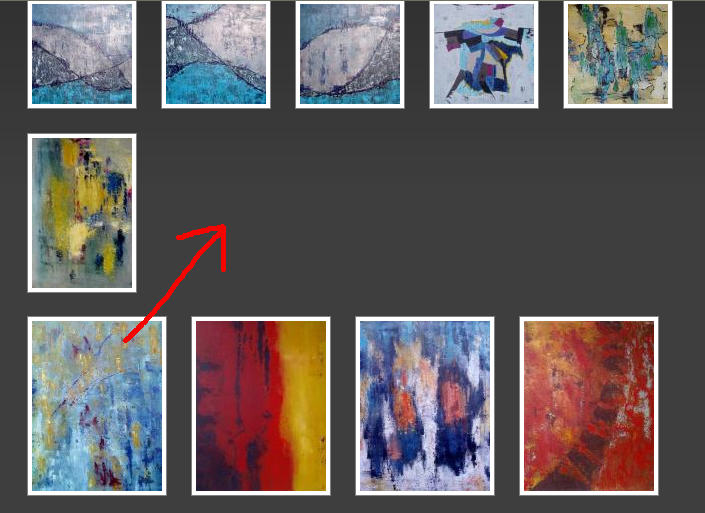
- move.jpg (63.46 KiB) Viewed 592260 times
[/img]
I've tried to write the codes like this
{AG thumbWidth="100" thumbHeight="80" thumbAutoSize="none"}folder1small{/AG}{AG thumbWidth="150" thumbHeight="120" thumbAutoSize="none"}foldermedium{/AG}{AG thumbWidth="200" thumbHeight="180" thumbAutoSize="none"}folderbig{/AG}
- but it has no effect.
Is it possible to do anything like this ?
NGJ